
Free tool · 100% Salesforce native
How much FinServ debt is hiding in your Salesforce org?
A free, native scanner that inventories your org's dependencies on the legacy Financial Services Cloud managed package and turns them into a scored, prioritized findings list with per-finding remediation in about an hour, with nothing leaving your org.
The problem
Migration scoping shouldn't start with grep and guesswork.
Most FSC-to-FSC Core scoping starts the same way: someone opens a sandbox, greps Apex for FinServ references, and hopes they didn't miss a formula field or a report filter. That guesswork is what turns a 6-week migration estimate into a 14-week one.
What it does
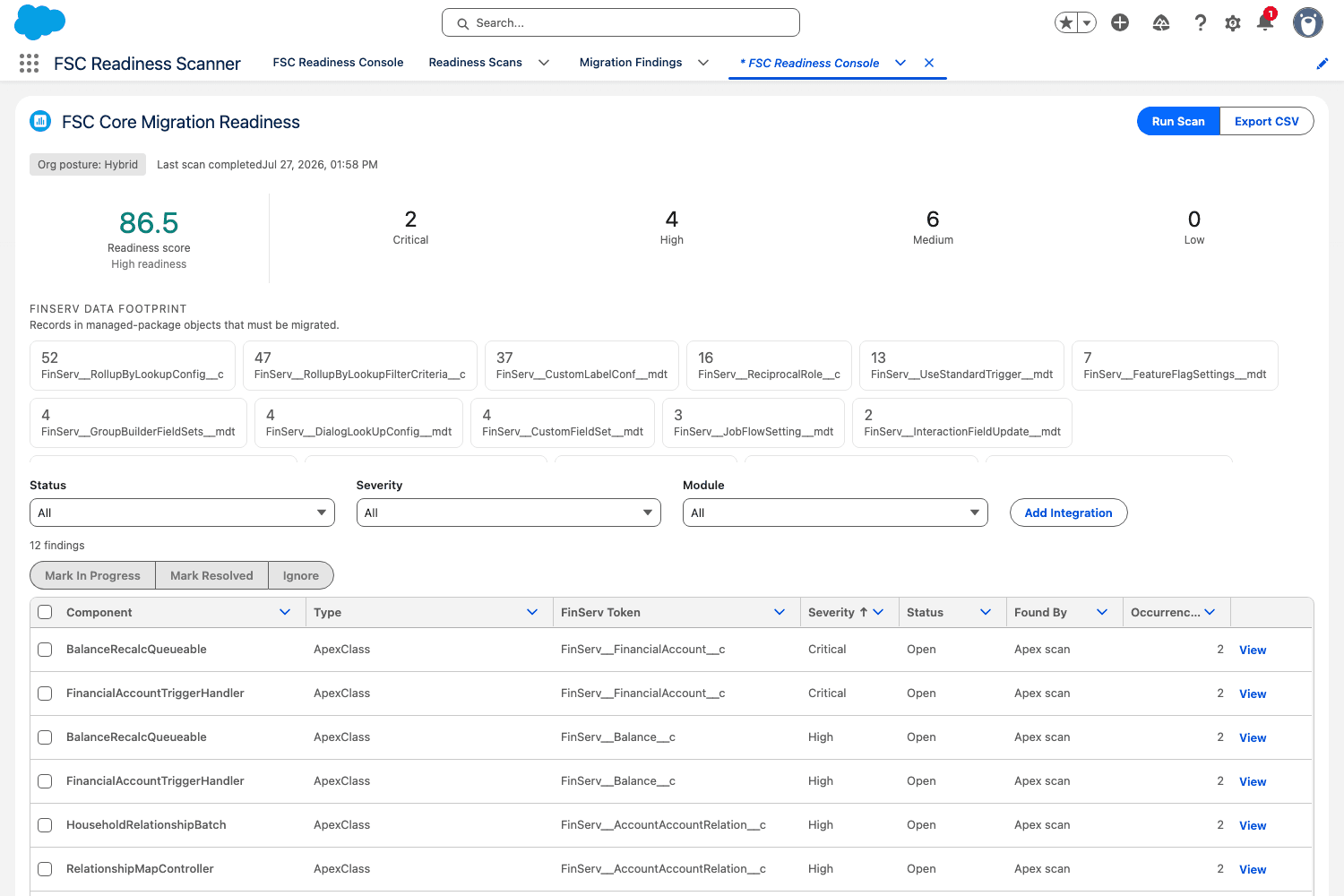
Your FinServ dependency inventory, scored.
Org posture detection
Identifies whether your org is package-only, hybrid, or already on FSC Core before anything else runs.
Apex scanning
Scans every Apex class and trigger for FinServ references, skipping comments and string literals so the signal stays clean.
Schema scanning
Finds subscriber custom fields, formula fields, and lookups that touch managed FinServ objects.
Data footprint
Row counts per FinServ object, so you know the data-migration scale before you scope it.
Scored 0–100
Severity-weighted findings backed by a rules catalog that ships remediation guidance and FSC Core equivalents per token.
Findings workbench
Triage, bulk-update, log manual integrations the scanner can’t see, and export CSV for the deck you’re about to build.
See it in action
Ninety seconds of scanner, no meeting required.
Each clip below is the real app running against a hybrid FSC org. Pick a capability and watch it work.
One score, zero guesswork (clip 1 of 5)
Every scan ends in a 0–100 readiness score with your org posture and a severity breakdown (Critical through Low) of every FinServ dependency it found.
Built for security-conscious orgs
No callouts. No external services. No data leaves your org.
Everything runs natively: Apex, custom objects, a Lightning console. There's nothing to configure on the network side because there is no network side.
with sharingon every class, all SOQL in user mode- Permission set is the only access path; no profile changes required
- Independently scanned with Checkmarx and Salesforce Code Analyzer. The results are published below, and the formal AppExchange listing is in progress
Don't take our word for it
These are the same materials assembled for Salesforce's security review, published here so you can verify before you install.
- Injection, XSS, CRUD/FLS, sharing & CSRFCheckmarx: every Critical & Serious query0 findings
- Medium-severity heuristicsCheckmarx12 flags, all false positives
- Hardcoded-secrets rulesSalesforce Code Analyzer v5No secrets, pattern matches only
- Scan findings, explained (PDF, opens in a new tab)Every flagged result from both scanners, with the line-by-line rationale.
- Architecture & usage (PDF, opens in a new tab)What the scanner reads, what it writes, and how access is controlled.
- No-callouts statement (PDF, opens in a new tab)Formal statement that the package makes no API callouts of any kind.
Scans ran in July 2026 against v0.5.0, the exact version at the install link. Raw scanner output is available on request via the contact form.
Get the scanner
Tell us where to send the install link.
You'll get the install link right here after you submit, plus a copy by email with a short guide for running your first scan.
Knowing where your org is today helps us point you at the findings that matter most. Package-only orgs and hybrids surface very different work.
FAQ
Common questions
The short version: it's free, it's native, and it never phones home.
Is this safe to run in production?
It’s read-only against your FinServ data. It only ever writes to its own tracking objects. Still, run it in a sandbox first; the install screen and delivery email both say the same thing.
Why isn’t this on the AppExchange?
Salesforce’s security review is required for the public marketplace listing, not for a direct install. The listing is in progress; sharing the direct install link is the completely standard route in the meantime. Because the review isn’t complete yet, Salesforce shows a standard notice during install.
What does it cost?
Free. No credit card, no trial clock. If the scan turns into more work than a solo admin wants to take on, that’s what Atlas is for; there is no obligation.
Does it touch our Flows or Reports?
Not in this version. It covers Apex, schema, and data footprint only. Flow and report coverage is scoped for a later version if there’s enough demand.
Does any data leave our org?
No. There are no callouts, no external services, and no remote sites. Everything runs natively inside Salesforce. The only thing that leaves your org is the CSV you choose to export.